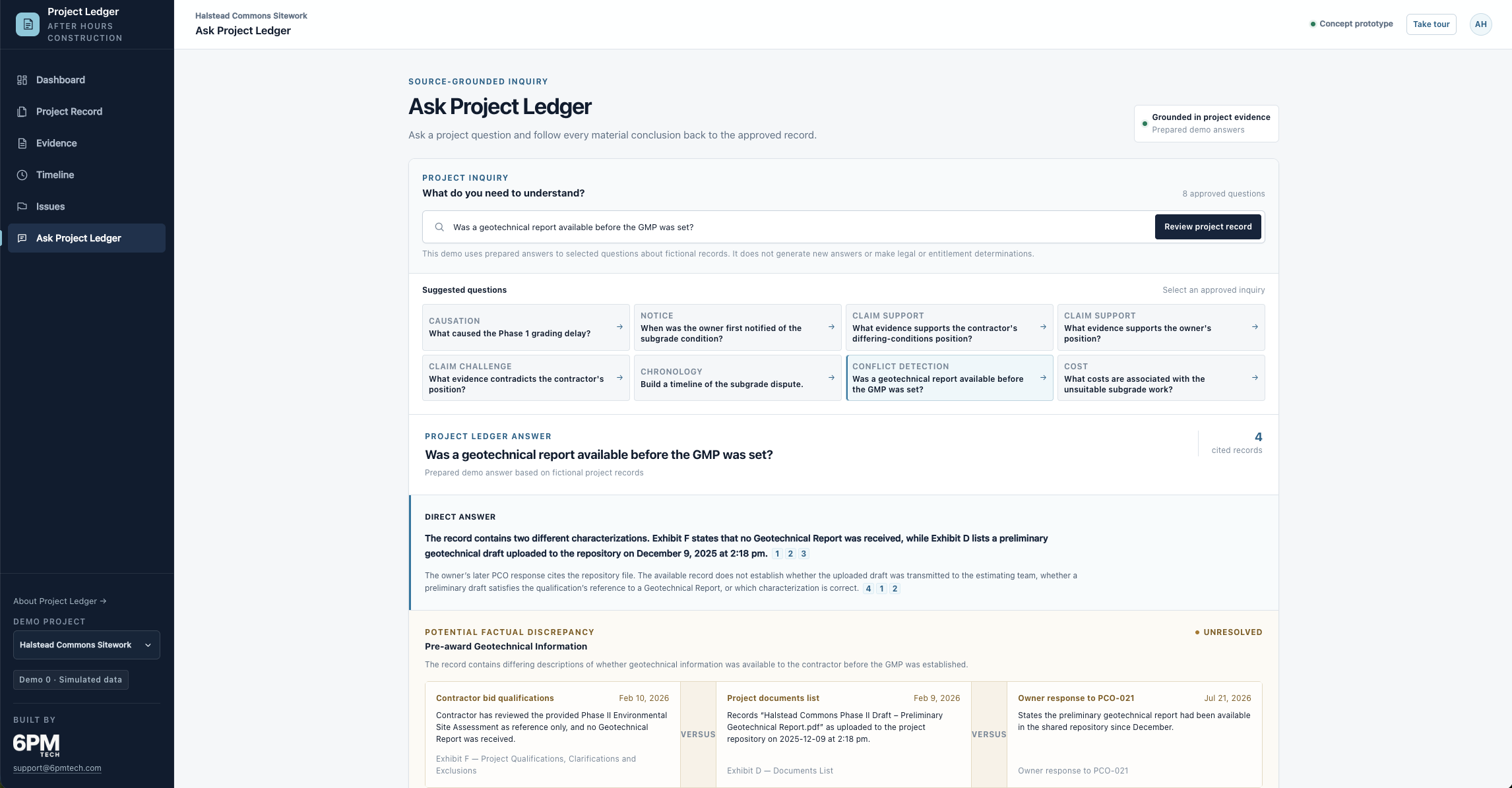
“Contractor has reviewed the provided Phase II Environmental Site Assessment as reference only, and no Geotechnical Report was received.”
Signed by the contractor with the agreement
Project Ledger explores a simple idea: connect the documents a construction project already produces, so the record can be understood, questioned, and checked against its own sources.
Someone sent the email. Someone filed the RFI. The superintendent wrote the daily report, the engineer answered, the minutes were taken. Every piece exists.
Understanding what actually happened means holding all of it at once — across email, drawings, schedules, reports and change orders, filed in four systems by a dozen people over eighteen months.
The same twelve documents, two ways Conceptual illustration
Four systems, no shared order, two copies of the same RFI. Answering one question means opening each file and holding the result in your head.
The intended experience: the same files connected around their issue and chronology, with the originals remaining in your existing systems. This illustration shows the concept; the demo uses prepared records and simulated connections.
Sequence and payment Conceptual illustration
A contract sets the order the work happens in, and payment follows that order. When work runs out of sequence, the invoice doesn't say so. It shows a line item and a percentage.
What reaches you
What the record shows
Resequencing happens on every job. This may be a sound field decision — or it may be work billed ahead of the milestone that funds it. From the invoice alone you cannot tell which, and the invoice is the only part of this that reaches you.
Traceability
In the demo, select a prepared question about the delay and read an answer with numbered citations. Open a citation to inspect the supporting fictional record — its content, source, date and sender.
From the demo you're about to open — two exhibits to the same contract, printed a day apart and signed together.
“Contractor has reviewed the provided Phase II Environmental Site Assessment as reference only, and no Geotechnical Report was received.”
Signed by the contractor with the agreement
“Halstead Commons Phase II Draft – Preliminary Geotechnical Report.pdf” — uploaded to the project repository on 9 December 2025 at 2:18 pm.
Printed the day before signing
These may not contradict each other at all. Exhibit F says no geotechnical report was received; Exhibit D lists a preliminary draft in the repository. The record does not establish whether it reached the estimator or whether that draft satisfies the qualification’s reference to a geotechnical report. Availability, receipt and draft status remain separate, unresolved questions.
Project Ledger surfaces the discrepancy. It does not invent a resolution. What it means is your call, and your advisors'.
Boundaries
The intended model connects records from existing systems, such as SharePoint, Google Drive and project email, or direct uploads. In this demo, connections and uploads are simulated; no external systems are connected.
It shows what the record establishes, the positions each party has taken, and the evidence behind them — including evidence that weakens a position. Entitlement and liability stay with the people qualified to judge them.
The prepared demo answers link material statements to supporting records and identify important gaps and uncertainties. They illustrate source grounding; the demo does not generate new answers.
Where it helps
The goal is to make an existing project record easier to review through connected issues, chronology and conflicting accounts. The demo lets you explore those relationships in a prepared fictional record.
Useful heading into a negotiation or a claim — and just as useful for finishing the job with a clear view of where things stand.
The longer-term concept is to connect records as a project unfolds, helping teams notice emerging issues while there is still time to act.
Continuous ingestion and automatic organization are intended capabilities, not working features of this prototype. Time and cost savings have not been validated.
See it working
An interactive demo of Halstead Commons Sitework — a fictional mixed-use sitework package in dispute over unsuitable subgrade found during mass grading. Every company, person and document in it is invented.
The demo exposes a curated selection of the 156 simulated records. The 61-day forecast variance includes overlapping causes; it is not an allocation of responsibility.
Demo · Simulated data · about 10 minutes · best on a desktop or tablet